
 ProcessIQ
Smarter processes. Better productivity.
ProcessIQ runs approvals, tasks and handovers for a whole organisation. You draw how a process should go, check it before it goes live, and from then on every request follows the route you drew, with a clear record of who decided what and when.
Free trial. No payment details needed to begin.
Draw a process once. Run it every time.
Who it is for: Operations, finance, HR, procurement and IT teams in small and mid-sized organisations that still run approvals through email threads, chat messages and spreadsheets.
Requests get lost
A request sent by email or chat has no owner and no place to be found. People ask again, and the work waits.
Approvals stall
Someone is away, someone is waiting for someone else, and nobody can say where a request stands.
No record of the decision
When a question comes later, there is no clear trail of who agreed, when, and on what grounds.
ProcessIQ launch video
A short tour of ProcessIQ: draw a workflow, track every request, route approvals, watch deadlines, simulate before go-live and keep a full history of every decision.
Read the transcript
Approvals shouldn't live in email threads.
Introducing ProcessIQ. Smarter processes. Better productivity.
Requests get lost. Approvals stall. And nobody can say where anything stands.
Draw a process once, in a visual designer, with forms, files, conditions and parallel branches.
Every request is tracked from start to finish, so you always know where it stands.
Approvals go to the right person, with delegation for when they are away.
Timers watch every deadline, and flag slipping work before it becomes a problem.
Simulate a workflow before it goes live, and catch dead ends early.
Start from a ready-made template instead of a blank page.
Or describe it in words and get a draft. A person always reviews it.
Reports show volumes, speed and missed deadlines, so you can see where work slows down.
And every decision is recorded, so you can prove who did what, and when.
Plus roles, organisation structure, JSON import and export, and API calls to your other systems.
ProcessIQ. Start free, no payment details needed. Smarter processes. Better productivity.
How ProcessIQ works
From setting up your organisation to a recorded outcome, in six steps.
- 01
Set up your organisation
Register, add departments and branches, set working hours and holidays, and invite people with the roles they need.
- 02
Design the workflow
Start from a template, import one, or draw it yourself with forms, approvals, tasks, conditions and timers.
- 03
Check, then publish
Validate to catch problems and simulate to see the route. Publishing creates a numbered version.
- 04
Someone submits a request
A person picks a published workflow, fills in the form and submits it. They can follow it from then on.
- 05
Approvals, tasks and timers
Approvers decide from their inbox or their phone, tasks go to the people who do the work, and deadlines are watched for you.
- 06
The outcome is recorded
The request ends as completed, rejected or cancelled, with every decision kept. Insights and reports show how the process performs.
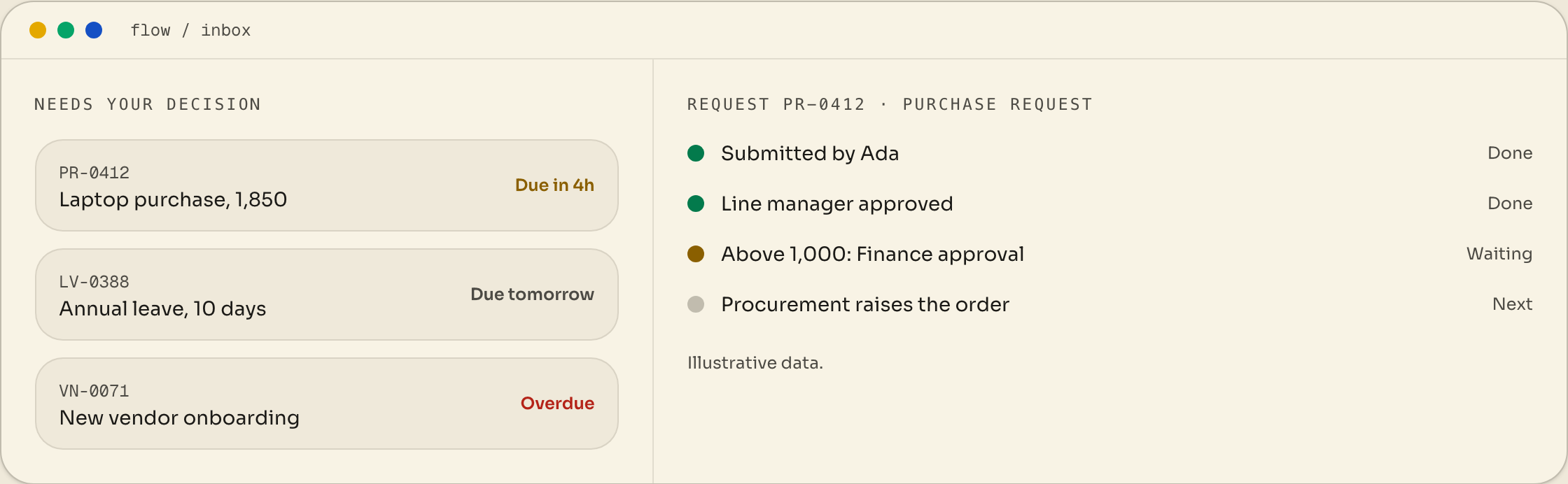
One request, start to finish
A purchase request as ProcessIQ would route it. Amounts and names are illustrative.
Swipe sideways to see the whole route.
Approval limits and the rule against approving your own request are enforced by the system, and running requests always finish on the version they started on, so a change to a workflow never disturbs work in progress.
Built for the work, not the demo.
Each capability below links to its full page on the ProcessIQ website.
A visual workflow designer
Build a process on a canvas from ten kinds of step, including approval, task, condition, timer, notification and API call. Each workflow has its own request form with required fields, rules, calculated values and file uploads.
Learn more →Conditions and parallel branches
Send a request down a different route depending on the answers, for example an extra approval above a certain amount, or run several reviews at the same time and continue when they are all done.
Learn more →Approvals with rules that hold
Choose how a decision is reached: any one approver, all, in sequence, by majority or by percentage. Approval limits by amount and the rule that you cannot approve your own request are enforced by the system, not only shown on screen.
Learn more →Delegation while people are away
An approver can hand their approvals to a colleague for a period, so a holiday or a day out does not freeze the process.
Learn more →Timers and deadlines
Set a deadline on a step. People get a reminder halfway to it, and the person and their manager are told when it passes, so slipping work is flagged instead of discovered.
Learn more →Validate and simulate before going live
Validation lists anything that would block publishing. A simulation walks sample answers through the workflow to show the route a request would take, without sending anything to anyone.
Learn more →48 ready-made templates, and optional AI drafting
Start from a template instead of a blank page, import a workflow from a JSON file, or describe the process in words and let optional AI draft it. A person always reviews the draft, and nothing is published automatically.
Learn more →Connect to your other systems
An API call step talks to the systems you already use and carries on down a different branch depending on whether the call worked. Thirteen ready-made connectors are also available as a preview: they have not yet been tested against live accounts.
Learn more →People, roles and structure
Model departments and branches, set working hours and holidays, and give each person one or more of the built-in roles. The requester's manager can be a step in the route.
Learn more →A complete history
Every decision, comment and event stays on the request. Important changes appear in the audit log, and requests can be exported to CSV.
Learn more →Process insights
For any published workflow, see where time goes step by step, the routes requests really took, and the approvals and tasks likely to miss their deadline, with suggested improvements and the evidence behind them. The suggestions come from fixed rules, not AI, and nothing changes unless you change it.
Learn more →Report builder and scheduled reports
Design your own reports over requests and approvals, save and share them, combine them into dashboards, and have a summary emailed daily, weekly or monthly to the people who need it.
Learn more →Notifications and a mobile-friendly app
Approvers can turn on push notifications on a phone or browser. A message shows only a title and a link. Approvals and tasks can be handled from a page built for a small screen; there is no native app.
Learn more →Admin tools
Create custom roles, set the organisation's name, colour and logo, export people, roles and the audit log to CSV, and check an email delivery log.
Learn more →Pay invoices online
Pay a subscription invoice by card or bank transfer from the Billing page using Pay now, or by bank transfer as before. Payments are confirmed with AlliancePay and access is restored automatically.
Learn more →
ResolveDesk
IT Service Desk & Management
ResolveDesk brings tickets, approvals, service levels and a knowledge base into one place. Every request becomes a ticket with an owner, a clock and a history, common answers are found before a ticket is raised, and the routine parts of running the desk run themselves. Paid services, single sign-on, automatic asset discovery, device monitoring and health for Mac, Linux and Windows computers, website blocking, automated remediation, a status page, licence tracking, monitoring alerts and your own reports are all part of it.

ClearVoice
Whistleblowing & Ethics Management
ClearVoice gives your organisation a confidential way to hear concerns and a clear way to deal with them. People report anonymously, cases are routed away from anyone with a conflict, deadlines are watched for you, and every step is recorded so you can show that you acted.